

What is it?
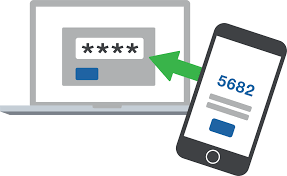
Two-step verification is an additional layer of security for accessing your account, which helps prevent hacking attempts and data theft. It works by using a code-generating application after it has been installed and configured on your phone.
Why is it needed?
Two-step verification helps protect your account:
- when using the same password on different websites;
- when downloading software from the internet;
- when using public computers;
- when clicking links in emails.
The security level of your account is significantly increased. Unauthorized access to your email becomes impossible, even if your password has been stolen.
How does it work?
- First, you enter your login and password;
- Then — a one-time code from the application installed on your phone.
Compatibility
Works with any mobile phone that can install an application for generating codes.
How to enable?
1) Install an application
- Android (FreOTP, Google Authentificator, Other)
- iOS (FreOTP, Google Authentificator, Other)
- Windows Phone (Authentificator, OTP Authentificator, Other)
2) Configure your account
- Log in to your account via the web interface;
- Go to your user profile;
- Open “Two-step authentication” → “Enable”;
- Scan the QR code using your installed application;
- Enter the code in the “PIN code” field;
- Click “Verify and save”.
After successful setup, you will be required to enter a code each time you log in. The code will be generated by the application installed on your phone.
How to disable?
- Go to “User profile”;
- Select “Two-step authentication”;
- Click “Disable” and confirm the action.
Problems with the code
If the code does not work — check the time on your phone or enable automatic time synchronization.
If the phone is lost or the app was deleted
Perform password recovery. After that, two-step verification will be automatically disabled for your account, and you will be able to log in using your new password.
In case you did not find your answer contact us