Clearing the Cache and Cookies in a browser helps to fix issues, which cause errors on a webpage if portal has got any changes of design or functionality. If cache is not cleared, browser will use old data instead of new, what can cause errors. Clearing the Cache and Cookies can fix these errors.
Sometimes it is necessary to clear the Cache more than once.
Google Chrome 69.0
1. Select the Tools icon ,
2. Select More toolsand Clear browsing data,

3. Select Advanced, time range All time and select checkboxes:
-
Cookies and other site data;
-
Cached images and files,

4. Click Clear data,
5. Close and restart your browser.
Mozilla Firefox 62.0
1. Select Open Menu / Options page:
2. Select Privacy and Security, History

3. Click Clear History, chose:
- choose Cache
- choose Cookies

4. Click Clear,
5. Close and restart your browser.
Internet Explorer 11
1. Select Tools  and choose Internet Options,

2. Under "Browsing history," click Delete,

3. Select the following checkboxes:
-
Temporary Internet files and web site files;
-
Cookies and web site data,

4. Click Delete,
5. Click OK,
6. Close and restart your browser.
Microsoft Edge 41.1
1. Select Settings and more and choose Settings,

2. Select Choose what to clear,

3. Select the following checkboxes:
-
Cookies and saved website data;
-
Cached data and files,

4. Click Clear,
5. Close and restart your browser.
Opera 55.0
1. Select and choose Clear browsing dataunder History,

2. In "Obliterate the following items from" select the beginning of time;
3. Select the following checkboxes:
-
Cookies and other site data;
-
Cached images and files,

4. Click Clear browsing data,
5. Close and restart your browser.
If You are using another browser or different version, here You can find usefull information about clearing the Cache.
What is an email alias?
Email alias (from English “alias” — nickname) is a way to create additional email addresses for your existing mailbox.
All messages sent to alias addresses are delivered to your main mailbox.
Why use an alias?
An alias is useful when you do not want to share your real email address.
For example:
Main address: janis.berzins@inbox.qa
Alias: j.reklama@inbox.qa
If you do not want your real email address to be publicly visible on the internet (for example, when registering on websites or posting ads), you can use an alias instead.
All messages sent to j.reklama@inbox.qa will be delivered to your mailbox janis.berzins@inbox.qa, and the sender will not know your real email address.
Important
- Alias validity is unlimited or until the main mailbox is deleted
- You can delete an alias at any time
- After deletion, messages will no longer be received
- Filters can be applied to aliases
- Alias cannot be used to log in
- Use your username and password to log in
- You can send and reply to emails from an alias
- Maximum: 1 aliass per mailbox
When are aliases useful?
- For long or hard-to-remember email addresses (e.g., jb@inbox.qa)
- For spam protection — delete an alias and create a new one
- For domain email users — create addresses like info@, support@, webmaster@, etc.
All messages will be delivered to your main mailbox.
How to create an alias
- Go to your mailbox settings
- Open “Forwarding and aliases”
- Select “Email aliases” → click “Add”
- Enter the alias name (without domain)
- Click “Save”
The alias will start working immediately after creation.
How to delete an alias
- Go to your mailbox settings
- Open “Forwarding and aliases”
- Select “Email aliases”
- Click “Delete” next to the alias
If you change your mind, click “Restore” and the alias will continue working as before.
Choose which browser you want to download:
Mozilla Firefox (recommended)
Google Chrome
Ms Edge
Safari (for iOS/MacOs)
Mypal (for Windows XP & Vista) - install can here (ZIP version - 78.0.v)
We don't support more:
- Internet Explorer
- Firefox 67 or below
- Google Chrome 60 or below
- Safari 11
- Edge 18
Problems with updating the browser by yourself?
If you are using a computer and you do not have rights to install or update the software, ask the administrator to do it.
It is not possible to update an existing web browser?
If you cannot change the browser due to lack of compatibility (for example, usage of old browser-specific software), you can install a second browser from offered and use it for web page viewing.
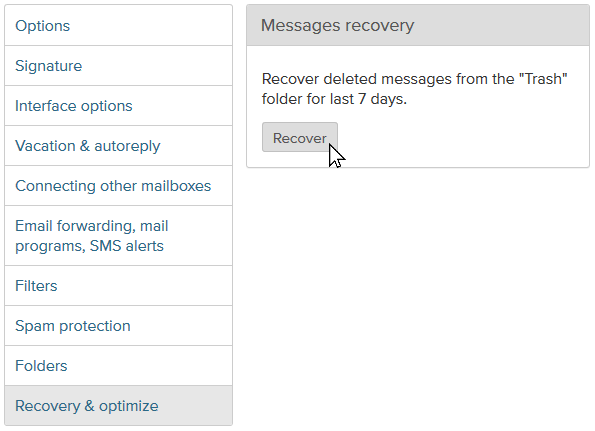
This option allows recovering deleted messages from the Trash folder for last 7 days. Attention! After pressing Recover button please wait about 15 minutes before all deleted messages will be recovered and placed back into Trash folder.
To recover deleted messages from folder Trash:
- Login into your account;
- Open section Options;
- From the menu on the left choose Recovery & optimize;
- To complete action, press Recover.