• বাড়ি
  • E-mail
  • Business
  • Files
  • Contacts
  • Advertising
  • আরো
    • E-mail
    • Business
    • Files
    • Contacts
    • Calendar
    • Games
    • News

    প্রিমিয়াম নিন
BD বাংলা
  • ਪੰਜਾਬੀ
  • English
  • Indonesian
  • Español
  • Français
  • Deutsch
  • Latviešu
  • Русский
  • Lietuvių
  • Eesti
  • عربي
  1. বাড়ি
  2. E-mail
  3. Interface Features

%MESSAGE%
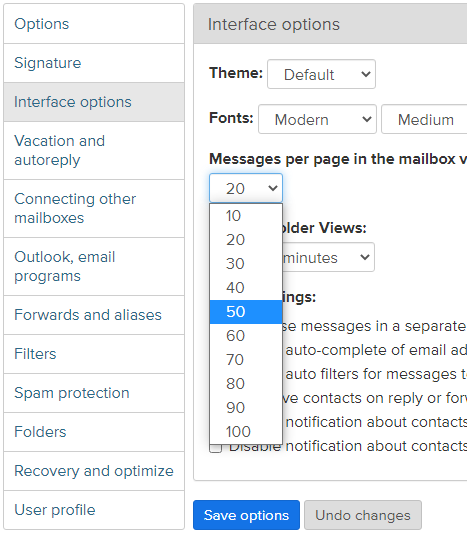
Messages per page in the mailbox view

To change the number of messages per page:

  1. Go to Options and open the Interface options;
  2. In the drop – down menu Messages per page in the mailbox view change the value, for example, from 20 to 50;
  3. Click Save Options.

     7e3967fab089af5342a9294253319a-1683541572-base.png


আপনি যদি আপনার উত্তর খুঁজে না পান তবে আমাদের সাথে যোগাযোগ করুন
প্রশ্ন

How to create a new signature in the letter?
Compose messages in a separate window
Auto-complete of e-mail addresses
Themes
When I send a message, my personal information isn't correct
Messages per page in the mailbox view
Mailbox optimization.
How to disable notifications of contact birthdays and name days?
How to change the text font and size of a letters?
Refresh folder views
সাইন আপ লগ ইন করুন

  • Inbox.qa
  • E-mail
  • Business
  • Files
  • Contacts
  • Calendar
  • Games
  • News

  • Contacts
  • Support
  • Advertising
  • Privacy
  • Terms of Service

Download our app