• ਹੋਮ
  • E-mail
  • Business
  • Files
  • Contacts
  • Advertising
  • ਹੋਰ
    • E-mail
    • Business
    • Files
    • Contacts
    • Calendar
    • Games
    • News

    Get Premium
ਪੰਜਾਬੀ
  • English
  • বাংলা
  • Indonesian
  • Español
  • Français
  • Deutsch
  • Latviešu
  • Русский
  • Lietuvių
  • Eesti
  • عربي
ਸਾਈਨ ਅਪ ਕਰੋ ਲੌਗਇਨ ਕਰੋ
  1. ਹੋਮ
  2. E-mail
  3. Mailbox overview

%MESSAGE%
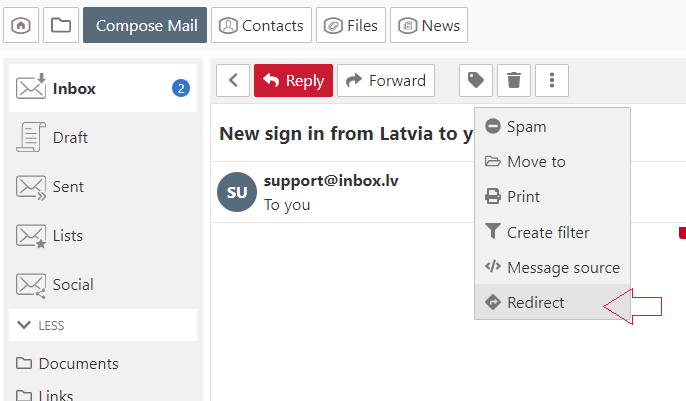
Redirect email

  1. Open the message,
  2. In the menu choose "More" and click "Redirect",
  3. In the new opened window in the  "To" field specify the recipient. If you want to redirect the email to multiple recipients, separate e-mail addresses with a comma,
  4. Click the "Redirect" button.


ਜੇਕਰ ਤੁਹਾਨੂੰ ਆਪਣਾ ਜਵਾਬ ਨਹੀਂ ਮਿਲਿਆ ਤਾਂ ਸਾਡੇ ਨਾਲ ਸੰਪਰਕ ਕਰੋ
ਸਵਾਲ

How to disable AdBlock program?
Redirect email
When I send a message, my personal information isn't correct
The message about web-page blocking
Auto Reply
View all unread messages in a folder
Message sorting
Letters and pictures size on the computer screen
Mark letter as
Threads
How to change “Inactive” mailbox status?
ਸਾਈਨ ਅਪ ਕਰੋ ਲੌਗਇਨ ਕਰੋ

  • Inbox.qa
  • E-mail
  • Business
  • Files
  • Contacts
  • Calendar
  • Games
  • News

  • Contacts
  • Support
  • Advertising
  • Privacy
  • Terms of Service

Download our app